 Chrome extension · Runs locally · No API token
CloudflareBilling Usage Helper
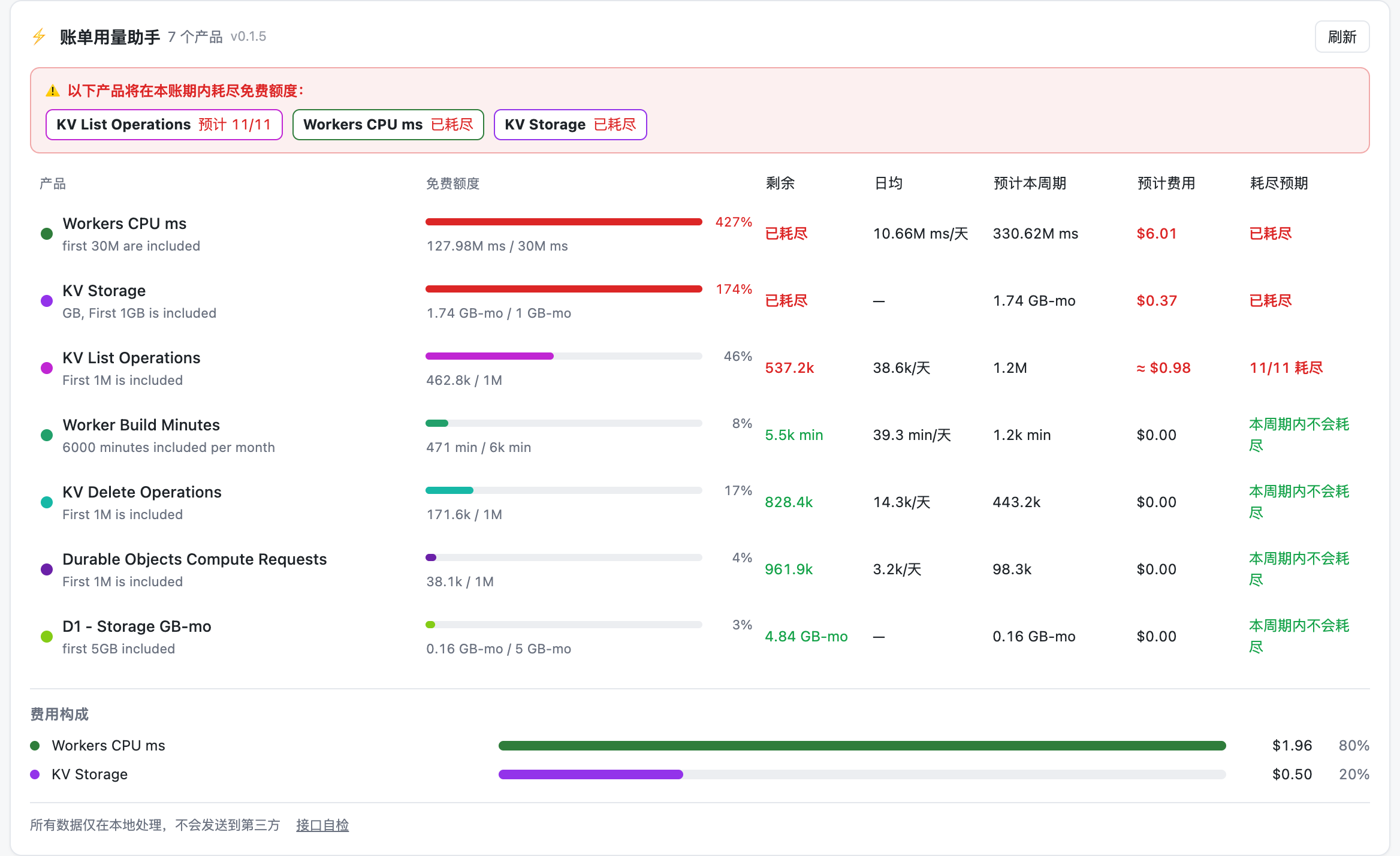
See free-tier headroom, projected exhaustion dates, per-product cost forecasts, and which Worker or namespace is actually driving your bill — right on the Billable Usage page.
Three questions the official billing page does not answer
Usage without headroom
The page shows 127.98M CPU ms, but not how much free quota is left or whether you should optimize.
No trend, no exhaustion date
Without a daily average or projection, you usually notice only after overage charges start.
A bill you cannot attribute
KV shows 1.74 GB-months, but which namespace is consuming it? You end up clicking through every one.
Six things you get out of the box
Everything is computed locally in your browser — no third-party requests are added to the billing page.
Free-quota progress
All 29 billing lines, with green / amber / red states at a glance.
Exhaustion forecast
Linear projection for request-based products, regression on daily storage for GB-month products — with an ETA.
Per-product cost forecast
Projects usage and overage cost for the cycle; catalog pricing (marked ≈) fills in for products that have not billed yet.
Per-app breakdown
Expand any row to see per-Worker, per-namespace, per-database, per-bucket and per-DO consumption.
Trend chart
The extension snapshots usage daily and draws a quota-consumption curve after two days.
Fully local
No telemetry, no third-party scripts; it only talks to dash.cloudflare.com using your session.
Five resource families, top consumers surfaced
Expand a product row to list per-app usage, sorted by consumption with share bars. Results are cached for 10 minutes.
- Workers: CPU time and requests per Worker script
- KV: GB-months, key count and read/write/delete/list per namespace
- D1: file size and row reads/writes per database
- R2: storage and Class A/B operations per bucket
- Durable Objects: requests and storage per object
Install (Chrome / Edge)
- 1
Build the extension
Clone the repo and build; the output lands in .output/chrome-mv3 (Node.js and pnpm required).
- 2
Load unpacked
Open chrome://extensions, enable Developer mode, click "Load unpacked" and select the build folder.
- 3
Open the billing page
Go to Dashboard → Billing → Billable Usage (/{accountId}/billing/billable-usage). The panel appears below the spend summary.
git clone https://github.com/meathill/cloudflare-billing-helper.git
cd cloudflare-billing-helper
pnpm install
pnpm build
Privacy
No telemetry, no third-party scripts, no requests beyond dash.cloudflare.com. Billing data is computed locally; caches and daily snapshots live in chrome.storage and keep at most three billing periods.
- No telemetry or third-party scripts
- Only talks to dash.cloudflare.com
- All data stays in your browser
FAQ
- Do I need an API token?
- No. The extension reuses your browser session and calls the dashboard’s own endpoints same-origin.
- Is my data uploaded anywhere?
- No. Everything is computed in your browser. There is no backend and no usage reporting.
- Why does some breakdown show "not available"?
- Breakdowns rely on the dashboard’s internal GraphQL datasets, whose fields occasionally change. The "self-check" link in the panel footer reports exactly which dataset failed — please file an issue with that output.
- Which accounts are supported?
- Cloudflare Workers Paid self-serve accounts, specifically the Billable Usage page. The panel is not injected on other pages.
Open source on GitHub
Issues and dataset updates are welcome — a star helps too.
Go to GitHub